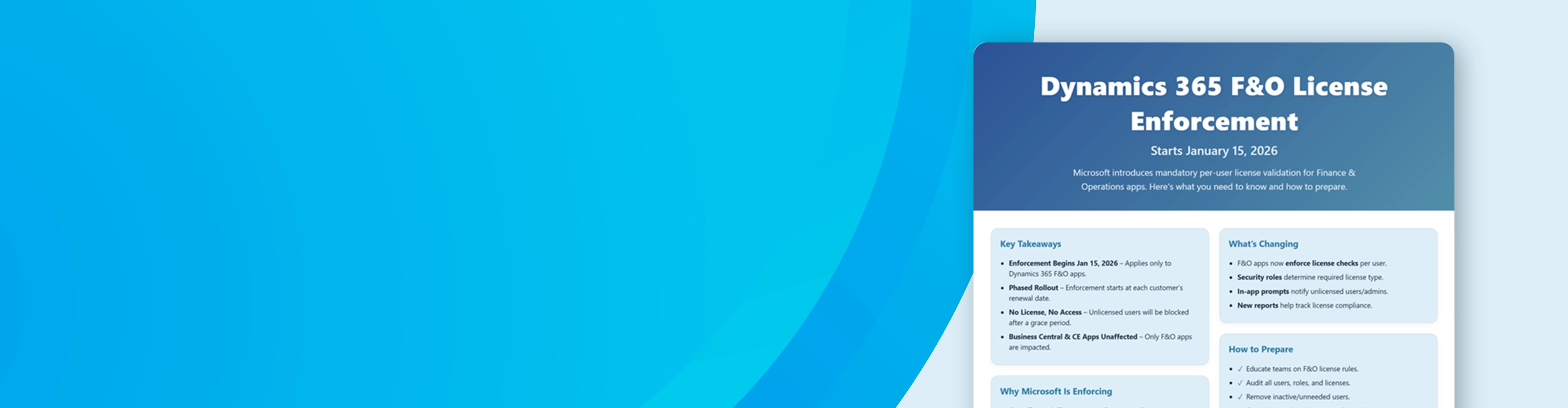

Get Ready!! Dynamics 365 F&O License Enforcement Is Coming
Starting January 15, 2026, Microsoft is rolling out a new license validation process for Dynamics 365 Finance and Operations apps—including Finance, Supply Chain Management, Commerce, Project Operations, and HR. This infographic breaks down what’s changing, when it takes effect, and how to prepare so your users stay compliant and uninterrupted.
Stay Ahead of the Curve
Use this visual guide to align your licensing strategy, avoid access disruptions, and support your customers through the transition. Below, you’ll find official Microsoft resources, tools, and documentation to help you take action with confidence.
Let me know if you’d like help formatting the resource links section or tailoring this for a specific audience (e.g., partners, customers, internal teams).
Official Microsoft Resources on Dynamics 365 F&O License
Validation (Jan 2026)

Simplifying License Management in D365 Finance & Operations: Improved User License Validation (Blog, Sept 25, 2025)
Official Microsoft Dynamics 365 blog announcement by Georg Glantschnig. Introduces the new per-user license enforcement policy for Finance, Supply Chain, Commerce, Project Ops, and HR apps, describing the staged rollout aligned to each customer’s renewal date and the rationale for this approach.
Dynamics 365 Finance & Operations License Enforcement FAQ (PDF, updated Sept 24, 2025)
Microsoft’s official FAQ document. Provides detailed Q&A on the license validation changes, including when and how enforcement occurs, definitions of contract anniversary vs renewal, the 15-day grace period around renewals, how admins will be notified, and best practices to prepare.

View License Consumption for Finance and Operations Apps (Microsoft Learn)
Documentation on using the Power Platform Admin Center to monitor Dynamics 365 F&O license usage. Explains the User License Consumption report for F&O apps, which shows total users requiring licenses, highlights unlicensed users (users with roles but no license), under-licensed users, and allows drilling down by product. This helps admins identify and fix licensing gaps before validation locks out users.
Stay Compliant with User Licensing Requirements (Microsoft Learn)
Guidance article for Dynamics 365 F&O admins on how to ensure every user has the correct license assigned. Covers how security roles determine license needs, how to assign licenses via the Microsoft 365 Admin Center, and tools to verify compliance. Scope: Focuses on Finance & Operations apps (Finance, Supply Chain Management, Commerce, etc.)– these new enforcement rules do not apply to Dynamics 365 Business Central or other non-F&O apps.


User Security Governance – License Usage Summary (Microsoft Learn
Overview of the new in-app “License Usage Summary” report introduced in Dynamics 365 F&O. Part of the User Security Governance tools, this report shows which license each user requires based on their current roles. It helps admins confirm that roles are configured correctly for licensing and find opportunities to optimize role assignments to avoid unnecessary higher licenses. (For example, identifying if a user needs only a Team Member license vs. a full Finance license.)
If you have more questions or
need help