

Internet safety: Protect yourself from online dangers.

Threat trends
According to the latest Q4 report, the year 2024 will see a record number of 2.55 billion threats blocked, equivalent to 321 attacks per second (up 9% on 2023).
Social engineering threats, with a record wave of scams, dominated the landscape,
86% of all attacks (social media, deepfake crypto, job offers containing malware – online threats).
- 🎭 Social networking scams have surged.
56% of threats come from Facebook, with counterfeit crypto-currency scams stealing millions of dollars.
- 📲 Mobile malware is on the rise – banking Trojans, spyware and fake loan apps are targeting people all over the world.
- 🚨 Ransomware is up another 50%, reinforcing the need for strong defenses and vigilance.
Source: Gen Threat Report-Q4-2024, February 6, 2025
The most common social engineering threats – how to recognize them?
Phishing – Beware of fake messages!
Phishing is a fraudulent technique used by cybercriminals who pretend to be someone they trust (a relative, friend, neighbor or colleague) to trick the victim into divulging personal information, such as passwords, login details or banking data (fraudulent websites, fake e-mails, fake phone calls, fake messages on social networks or other messaging apps such as WhatsApp, a parcel to pick up, a transport ticket, late payment or even to renew your carte vitale, bank account, CPF, ……).
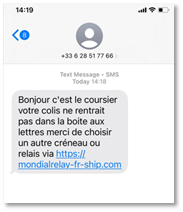
Smishing, a contraction of SMS and phishing, is a mobile attack technique in which cybercriminals attempt to obtain sensitive data (credit card numbers, login credentials, etc.) and steal money from victims via fraudulent text messages (malware).
Tip of the Day!
- Vigilance is the best shield.
Be wary of any unusual e-mail, text or direct message on social networks or sms - Don’t respond to any unexpected requests.
- Do not click on the link or attachment.
Cybercriminals are banking on the fact that you think this text message is legitimate and true, as the touch gesture has become the norm. - Never communicate confidential information
by e-mail, SMS or telephone. - Check that your antivirus software is up to date
to maximize your protection against malware.
Ransomware – A threat that blocks your files!
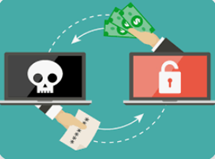
Ransomware is malicious software designed by cybercriminals to hack into and block access to your computer or the files it contains, to force you to pay a ransom. The computer can be infected by opening a corrupted e-mail attachment or link, or by simply surfing the Internet.
To deactivate the infection and free your data, there is a solution (with no real guarantee): pay a ransom demanded by the hacker (usually in crypto currency).
Tip of the Day!
- Regularly and systematically apply security updates not only to your operating system, but also to the software installed on yourcomputer.
- Install and update your antivirus software on your computer and follow its advice.
- Don’t open e-mails, attachments or click on links from unknown senders
or from a known sender with an unusual or empty message structure. - Don’t install “pirated” applications or programs and avoid unsafe or illicit sites.
- Make regular backups of your data
- Use sufficiently complex passwords and change them regularly
Emerging online scams – Beware of manipulation!
Growing scams continue to invade almost every corner of the virtual world with the aim of extracting sensitive information, convincing, or psychologically manipulating, … to obtain money. To achieve this, scammers use a wide variety of methods (fraudulent phone calls or phishing e-mails, unusual or urgent requests for confidential information, …)
The fake technical support scam consists of scaring you (by SMS, telephone, chat, e-mail, or by the appearance of a message blocking your computer) by indicating a serious technical problem, a risk of losing your data or the use of your equipment, in order to get you to download an app to take control of your computer remotely and then pay for a pseudo computer repair, without even having seen the device first.
Tip of the Day!
- Know that Microsoft, Google, Apple (any company) will never call you to tell you that your computer has a problem.
- And beware: no official technical support will ever contact you to ask for money.
Job offer scams (Internet marketing operators)
Fraudulent calls are on the increase.
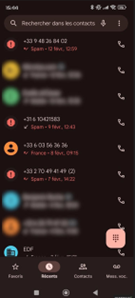
To appear more legitimate, scammers don’t hesitate to use European country codes, such as +44 from the UK or, more recently, +31 from the Netherlands. The real origin of these scams is Asia.
This scam, known as the “task scam”, involves offering to carry out micro-tasks for a fee (a tempting promise of profits). When you pick up the phone, a voice robot invites you to send a message to a certain number. Once they’ve earned your trust, they’ll ask you to pay a substantial sum to unlock even higher-paying tasks.
Tip of the Day!
- Don’t answer unknown numbers, especially those from abroad.
- Vigilance is your best protection.
Romance scams
- Scammers usurp an online identity or establish fake romantic relationships to gain trust or affection to entice the victim to send money or share personal information, usually on dating platforms or social media using fake profiles.
The risks: access to the victim’s bank accounts to perpetrate other thefts and fraudulent operations.
Tip of the Day!
- Be careful about what you post or publish on social networks and dating sites.
- Never send money to someone with whom you have only had online or telephone contact.
- Reverse searches your contact’s photos.
- Never send intimate photos or videos to virtual contacts.

Best practices: How can you protect yourself effectively on the Internet?
1. Manage your passwords intelligently
- Use a sufficiently long and complex password: at least 12 characters (numbers, letters, special characters).
- Change your passwords when in doubt
- Use a password manager.
2. Back up your data regularly
- A regular backup protects you in the event of breakdown, loss, theft, destruction of your equipment or hacking.
→Choose a USB key, hard drive or Cloud
3. Update regularly
- An out-of-date device or software is an easy target for hackers.
4. Install effective protection
- On the Internet, malicious files and other threats are numerous and varied.
Antivirus and firewall protection are essential.
5. Beware of public or unknown Wi-Fi networks
- Public Wi-Fi networks are a godsend for hackers.
Use a VPN to encrypt your browsing!
6. Separate your personal and professional uses
- With the proliferation of Internet access, your personal and professional information is becoming increasingly accessible. Protect your sensitive information!
7. Avoid suspicious sites and risky downloads
- They often contain hidden viruses.
8. Don’t click on suspicious links or attachments
- Be vigilant and always check the legitimacy of the sender
9. Be careful about the personal or professional information you share
- The less you say, the better protected you are
10. Activate dual authentication to secure your access.
- Secure your accounts by adding an extra verification step
Source : Cyber malveillance – 10 basic rules for digital security
🔎 Find out more and strengthen your cyber security: 💻 www.GenDigital.com
The Norton brand is part of Gen.